

Captions That Read Along, One Word at a Time
ASS karaoke, a fixed mobile anchor, and the one-line bug that highlighted the wrong word.
Search for a command to run...
ASS karaoke, a fixed mobile anchor, and the one-line bug that highlighted the wrong word.
No comments yet. Be the first to comment.
Designing tools for LLMs is not designing REST APIs — fewer round trips beats clean orthogonality

Both expose usage and cost endpoints. Both have gotchas. Here's the wiring that actually worked.
Digital Craft Workshop - Deep Tech Notes
3 posts
Digital Craft Workshop is where I document the craft of building software. This is the technical wing — production post-mortems, architecture decisions, and AI-native development notes, written for engineers who ship. Subscribe for email-only deep dives.
One evening, the reel looks perfect — until I read along. My voice says "memory," and the word glowing on screen is "billing." One word ahead. The whole reel, every scene, the highlight runs ahead of me, like a bad karaoke machine.
The fix was one character. Finding it took longer than it should have.
Part 3 ended with a SceneAudio object — an audio clip, and a list of words, each with a start and end in seconds:
type SceneAudio = {
  audioPath: string;
  words: { word: string; start: number; end: number }[];
};
This post is about how that data gets spent. It colors each word the moment the voice reaches it.
Reels are watched on mute. Most of the feed scrolls past with the sound off — on a train, in a meeting, next to a sleeping kid. Without the words on screen, it's just images changing with no context.
Captions carry the reel. For most people who see it, they're its only voice. Static captions — a block that sits there for the whole scene — are the lazy version.
The eye reads the whole block at once, then leaves.
Word-by-word highlighting fixes that. The color fill is a progress bar your eye can't look away from. It pulls you word to word at the speed it's spoken.
That's the karaoke effect — the part of the caption stage that actually earns its place.
ASS — Advanced SubStation Alpha — is a subtitle format: a plain text file describing which words show, when, and how they're styled. libass renders it, and FFmpeg already speaks libass.
My first instinct, though, wasn't ASS. It was a caption library — a React renderer, a canvas animator, one of the npm packages built for animated subtitles.
Every one of them wanted to own the render:
draw to a canvas
spin up a browser
re-encode the video their way
I already had an FFmpeg pipeline compositing scenes. I didn't want a second rendering engine bolted to the side of the first.
ASS is older than all of them, and it does one thing well. The whole caption stage comes down to this: generate a text file, hand it to a filter I'm already running.
No new dependency. No second renderer. A .ass file is just text:
[V4+ Styles]
Style: Caption,Inter Black,68,&H002626DC,&H00FFFFFF,&H00000000,&H80000000,1,0,0,0,100,100,0,0,1,6,3,2,80,80,120,1
That one line is the entire look: Inter Black, 68pt, a 6px black outline and a soft shadow so white text survives over any background. The two colors that matter are PrimaryColour &H002626DC and SecondaryColour &H00FFFFFF.
ASS colors are BGR, not RGB, and read backwards — &H002626DC is #DC2626, the accent color. That's the color a word becomes: white until the voice reaches it, the accent once it has.
Here's the function that turns one scene's words into one subtitle line:
function buildDialogue(event: LineWord[][], offsetSeconds: number): string {
  const allWords = event.flat();
  const start = allWords[0].start + offsetSeconds;
  const end = allWords[allWords.length - 1].end + offsetSeconds + 0.1;
  const lineStrings = event.map((line) =>
    line
      .map((w, wi) => {
        const durCs = Math.max(2, Math.round((w.end - w.start) * 100));
        return `{\\kf\({durCs}}\){escapeAss(w.word)}${wi < line.length - 1 ? " " : ""}`;
      })
      .join("")
  );
  const body = lineStrings.join("\\N");
  const positioned = `{\\an2\\pos(540,1800)}${body}`;
  return `Dialogue: 0,\({fmtTime(start)},\){fmtTime(end)},Caption,,0,0,0,karaoke,${positioned}`;
}
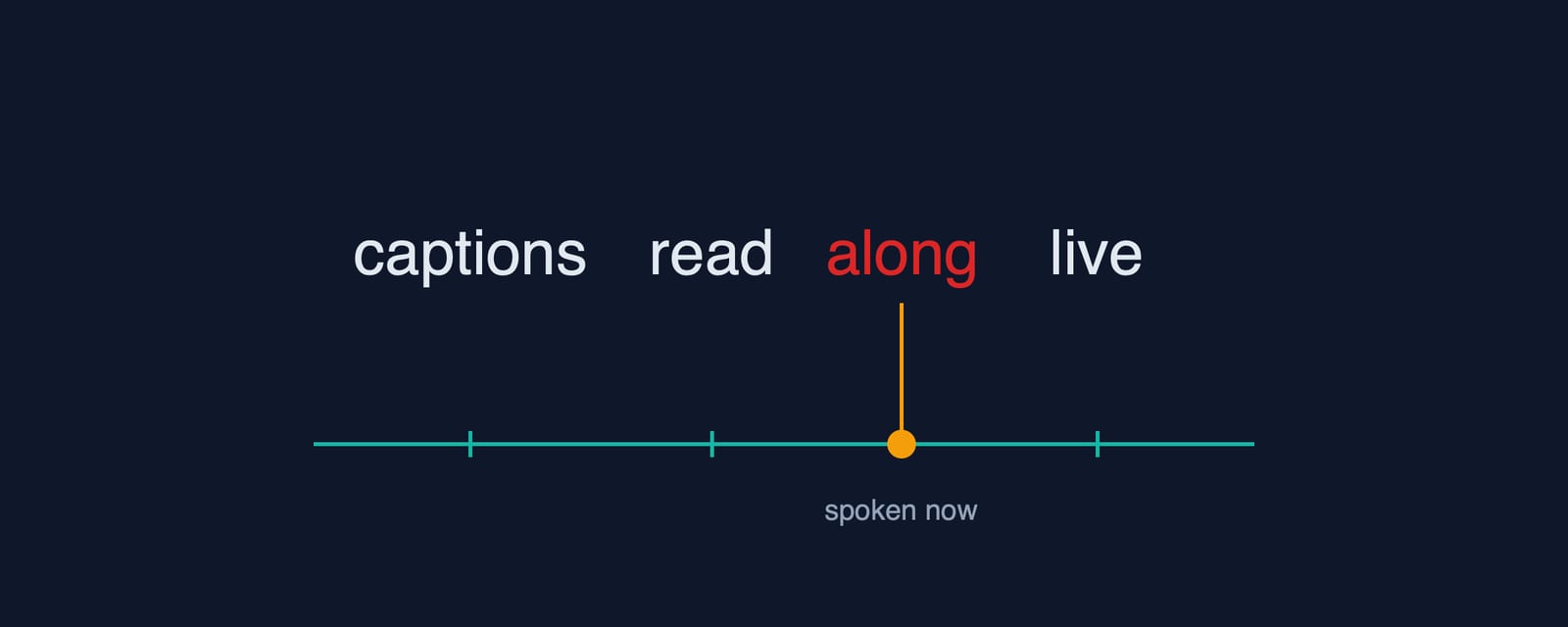
Every word becomes {\kf52}word, where 52 is the word's duration in centiseconds — a word that takes 0.52 seconds to say. libass walks the line left to right, filling each word over its \kf duration, then moving on. Add up all the \kf values and you get the line's length.
Math.max(2, …) is there for a reason. A word can land with a zero-width timing, like punctuation or a render glitch. That gives it a \kf0 and makes it flash. Flooring it at two centiseconds keeps it animating.
The first version let ASS auto-place the subtitle. A one-word hook sat low; a three-line caption pushed itself up to fit.
Between scenes, the captions hopped around the bottom third of the screen.
The fix is one tag:
{\an2\pos(540,1800)}
\an2 anchors the text by its bottom-center. \pos(540,1800) pins that anchor to x=540 (dead center of a 1080-wide frame) and y=1800 (120px off the bottom of a 1920-tall one).
Whether a caption is one line or three, its bottom edge is always at y=1800. It grows upward from a fixed floor instead of floating.
Back to that misaligned reel and the word that was always one ahead.
Everything else in my pipeline runs on absolute time. A scene starts a few seconds in. A word starts a moment later. Absolute timestamps, all the way down.
So when I wrote the karaoke layer, I reached for the same model. Each word gets the timestamp it starts at.
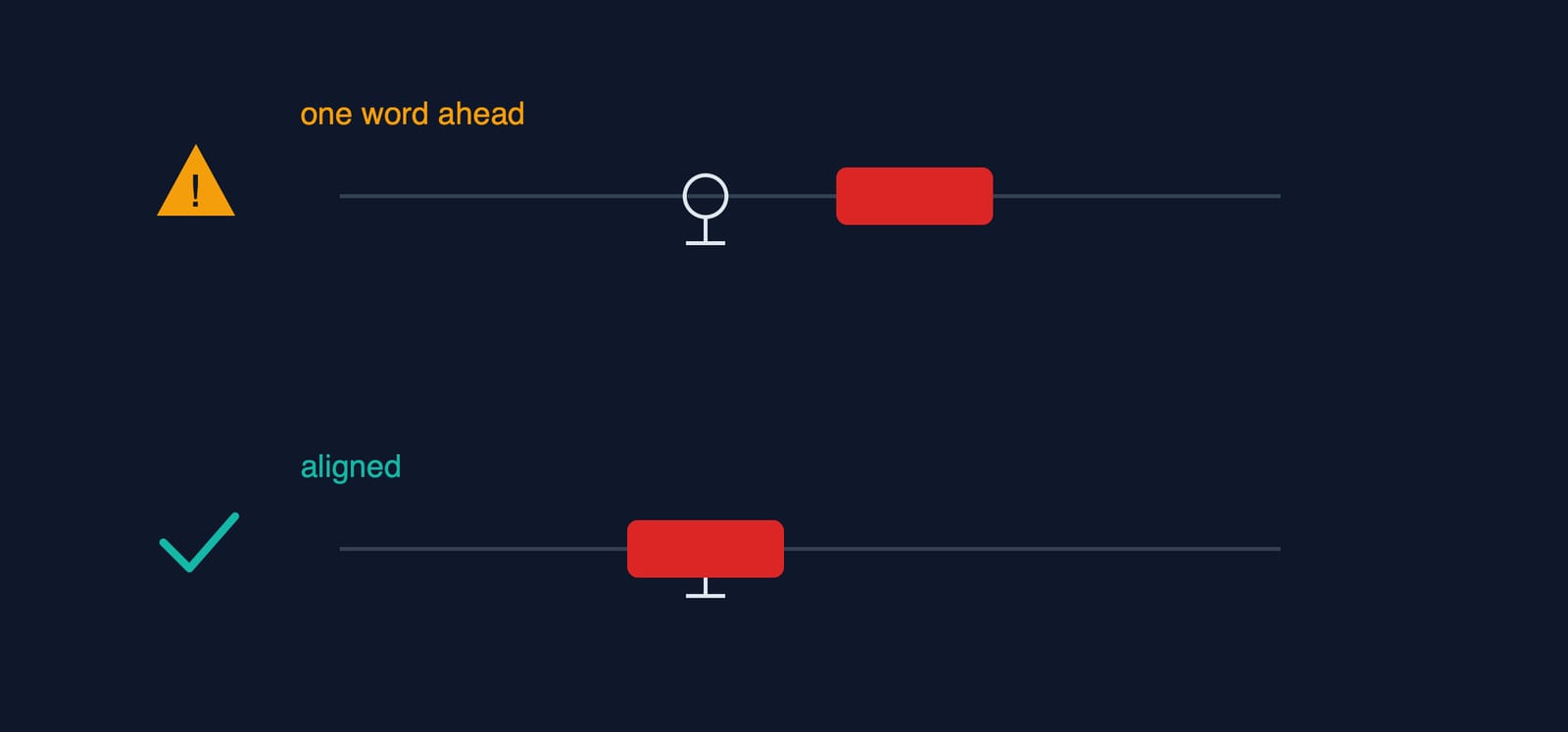
That is not how \kf works. Karaoke durations are sequential offsets from the line's start. Each value measures a span. It says how long to fill this word before moving to the next.
I'd built the line by feeding each word the next word's figure. It was a classic index slip. I wrote words[i + 1] where I needed words[i]. Every fill ran one word long, so the highlight stayed one word ahead of the voice.
The fix was deleting the +1. Each \kf now comes from the word's own end - start, the same line shown above.
When a format looks like one you already know, check whether its numbers mean the same thing. Here they didn't. Everything in the pipeline was absolute, but the karaoke timings were relative.
The caption stage has one more job. The scenes don't start at zero — each word's start is relative to its own scene's audio, but the final reel is all scenes concatenated with a 0.4-second pause between them.
So the renderer carries a running offset:
const INTER_SCENE_GAP = 0.4;
let cumulativeOffset = 0;
for (let i = 0; i < scenario.scenes.length; i++) {
  // ... synthesize audio, collect per-word timings ...
  sceneTimings.push({ audioOffsetSeconds: cumulativeOffset, words });
  const isLast = i === scenario.scenes.length - 1;
  cumulativeOffset += narrationDuration + (isLast ? 0 : INTER_SCENE_GAP);
}
buildDialogue adds that audioOffsetSeconds to every word, so scene 3's captions land at scene 3's real position in the finished video. The 0.4s gaps sit between scenes, where there are no words, so the karaoke clock never accounts for them.
The last step is one FFmpeg call:
ffmpeg -i concat.mp4 \
  -vf "subtitles=filename='captions.ass'" \
  -af "loudnorm=I=-14:TP=-1.5:LRA=11" \
  -c:v libx264 -pix_fmt yuv420p -r 30 \
  -c:a aac -b:a 160k -ar 48000 -movflags +faststart final.mp4
subtitles= hands the .ass to libass, which renders every \kf, \an, and \pos onto the frames.
The -af loudnorm next to it is unrelated but worth a note. It normalizes the audio to -14 LUFS, the level Instagram, TikTok, and YouTube Shorts target. Skip it and the reel plays quieter than everything else in the feed.
At the end of the caption stage I have a vertical video. Narrated in my voice. Karaoke words pinned to a fixed line, loudness-matched to the platforms. It plays. It reads. On mute it still works.
It's also completely still. Behind those captions is a static card — a background color, a headline, a stat.
Nothing moves. A frozen image with animated text on top is barely better than a slideshow.
Part 5 takes on the next problem: motion. Each scene gets three SVG layers, rendered through sharp (a Node image library) at 2160×3840, then animated with FFmpeg's zoompan. That's the Ken Burns effect, a slow zoom that makes a still image feel alive. It's the motion baseline, before any GPU gets involved.
This is Part 4 of a series on the reel-generation pipeline I built into Digital Craft Workshop. The full write-ups, in order, live on my Substack.